
Buy Simplode Suite - Color Grabber PC

This content requires the base game: Simplode Suite

Interested in Simplode Suite - Color Grabber? We're tracking prices from trusted stores. Add Simplode Suite - Color Grabber to your wishlist and we'll notify you when deals become available.

Release: 17 Sept 2020
Official
Unavailable
Keyshops
Unavailable
Buy in Official Store:
Unavailable
Buy in Keyshops:
Unavailable

No entries, but don''t worry, we will inform you once the new offer appears.

Create Alert Create deal Alert

About Simplode Suite - Color Grabber

Simplode Suite - Color Grabber - about the game
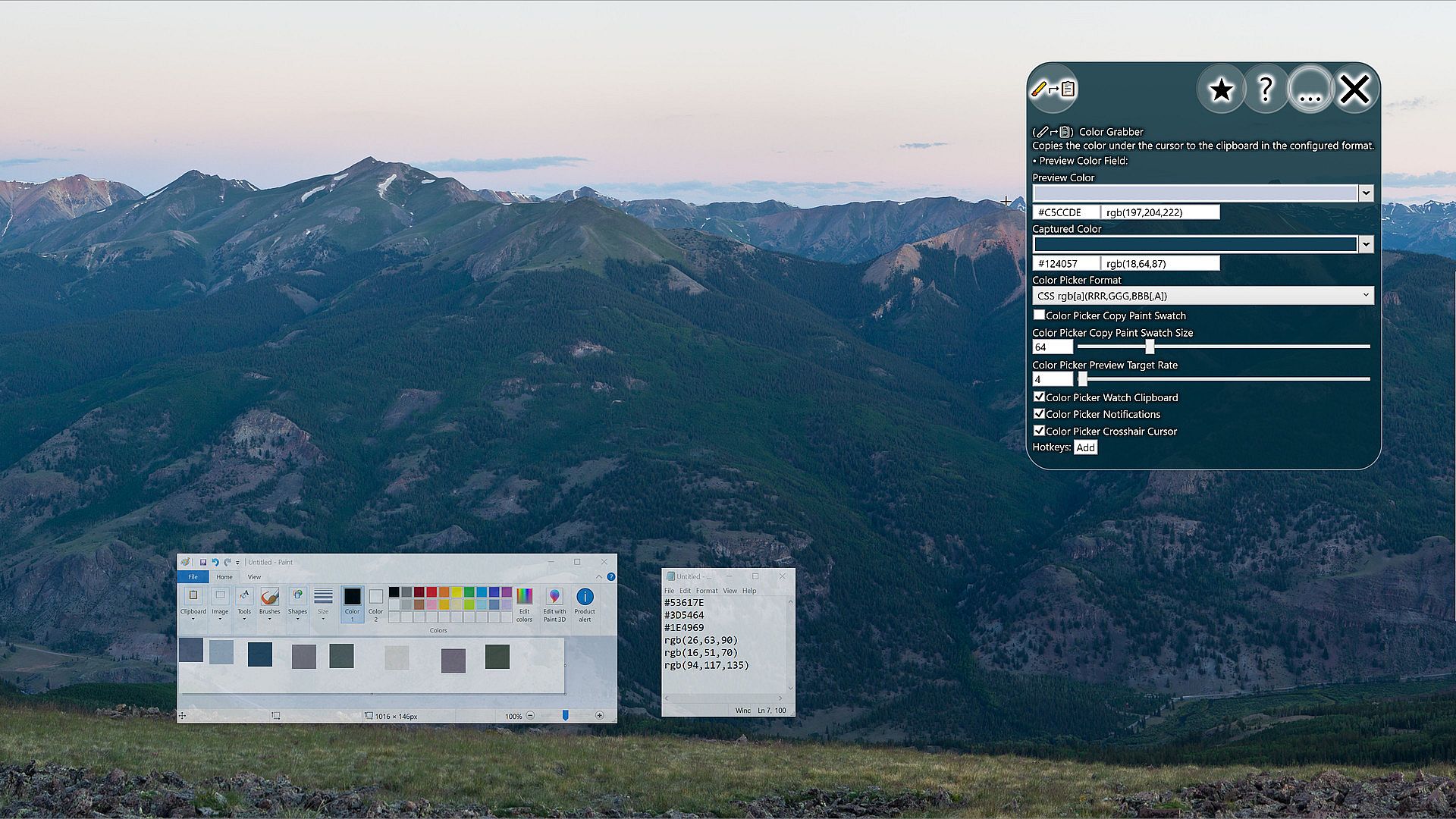
The Color Grabber package simply enables you to quickly grab color information from pixels on screen and access this information in various formats or copy directly to clipboard. You can also quickly copy a single pixel or color swatch of configurable size as an image.
This product is available natively in English, but it has automated translations for most major languages.
Contents: Color Grabber (⮣)
Color Grabber (⮣)
Copies the color under the cursor to the clipboard in the configured format.
  • Preview Color Field:
Settings:
  • Color Picker Format (Default: Hex #[AA]RRGGBB)
    This is the format that the Color Picker will use when copying color information to your clipboard.
    - Hex #[AA]RRGGBB: A compact hexadecimal color format. The alpha transparency (if included) is incompatible with many older web browsers.
    - CSS rgb[a](RRR,GGG,BBB[,A]): A color format with general compatibility with all browsers' CSS implementations, including alpha transparency support.
  • Color Picker Copy Paint Swatch (Default: False)
    If enabled, copies a paint swatch to the clipboard instead of the color string.
  • Color Picker Copy Paint Swatch Size (Default: 64)
    Controls the size of the paint swatch that the color picker will put on the clipboard.
  • Color Picker Preview Target Rate (Default: 4)
    This is the target rate at which the color grabber preview will try to update itself when visible, in frames per second. Setting the rate to 0 will disable the feature.
  • Color Picker Watch Clipboard (Default: True)
    If enabled, the color grabber window will watch the clipboard for valid colors and update the captured color accordingly. This is useful for quickly converting color information from decimal to hexadecimal or from hexadecimal to decimal.
  • Color Picker Notifications (Default: True)
    If enabled, the color picker will create a visible notification of the color found.
  • Color Picker Crosshair Cursor (Default: True)
    The crosshair cursor is supposed to be better for pixel accurate selection. When enabled, the system crosshair cursor will be used when grabbing a color. If you use the secondary action or a hotkey, however, the cursor will not change, as this setting only impacts the two-step selection process where you click the button and then click your target.
Interface:
ArabicBulgarianCzechDanishGermanGreekEnglishSpanish - SpainSpanish - Latin AmericaFinnishFrenchHungarianItalianJapaneseKoreanDutchNorwegianPolishPortuguese - PortugalPortuguese - BrazilRomanianRussianSwedishThaiTurkishUkrainianVietnameseSimplified ChineseTraditional Chinese

Minimum:

  • OS: Windows 10
Historical low
Price history from official stores
-
-
-
Price history from keyshops
-
-
-
Join our Discord
Get instant help from our community and stay updated on the latest deals
Set Price Alerts
Get notified by email when game prices drop to your target
Create Free Account
Unlock wishlists, price alerts, and Steam sync

FAQ

8 questions

Before you start looking for a cheap Simplode Suite - Color Grabber key, check the essentials. Developed by Simplode LLC. Published by Simplode LLC. PC released date: 17 Sept 2020. Genres: Casual, Utilities, Design & Illustration. Categories: Downloadable Content.

Q

Where to buy a cheap Simplode Suite - Color Grabber Steam key?

There are currently no active offers for Simplode Suite - Color Grabber. Set a price alert on XD.deals and we will notify you the moment a deal becomes available.

We don't have a current Steam Store price for Simplode Suite - Color Grabber. The game may be temporarily unavailable or not yet listed on Steam.

Our price tracker covers both official retailers and key marketplaces, so you can find Simplode Suite - Color Grabber on sale even outside seasonal promotions. We currently detect 0 active offers from official stores and keyshops. Check the table above, compare against the historical low, and set an alert so you never miss the next price drop.

Based on our data, Simplode Suite - Color Grabber is not currently available on GeForce NOW. You will need to run it locally on your PC. Browse games available on GeForce NOW.

Yes. Simplode Suite - Color Grabber has an official page on the Steam Store, but we currently don't track any third-party offers with Steam DRM. Check back later or set a price alert.

Not at this time. Valve marks Simplode Suite - Color Grabber as Unsupported on Steam Deck. Keep an eye on XD.deals - we track Proton updates and community fixes. Browse games that are Steam Deck Verified or Steam Deck Playable.

Simplode Suite - Color Grabber does not appear to be available on PC Game Pass, EA Play, Ubisoft+ or any other PC subscription service at this time. Your only option is purchasing the game - use XD.deals to find the best price.

No - XD.deals is not a store. We are a price-comparison service that tracks the best Simplode Suite - Color Grabber deals across official stores and verified keyshops. Click "Go to Store" next to any offer and you will be redirected to the retailer's website to complete your purchase.

Want to buy at the best moment? Set a price alert on XD.deals and get notified when Simplode Suite - Color Grabber hits its next historical low.

Create Alert